 Company Kernel
Your AI is guessing about your company.
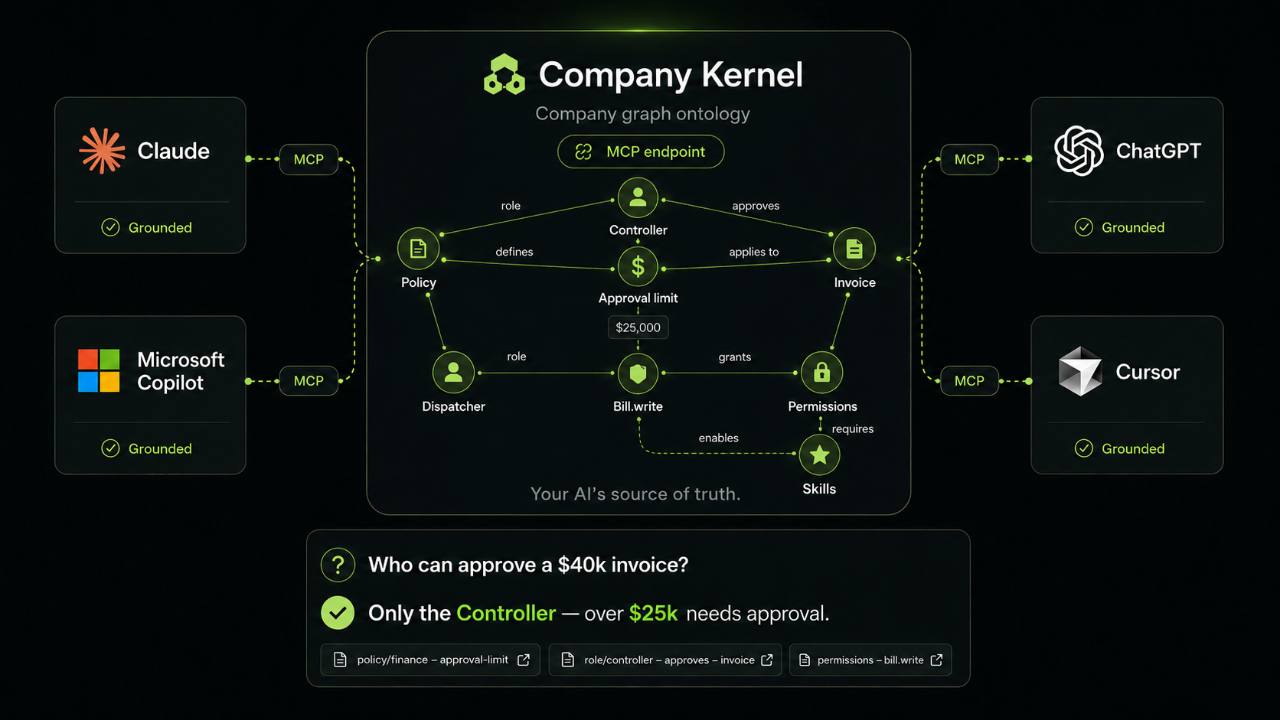
Map how your company really works — who does what, who approves what — in one place, and connect the AI tools you already use. Every answer is cited, or an honest “I don't know.”
Never a guess.
Create your workspace.
Four fields. About two minutes. No credit card.
Your workspace is live.
Your company now has its own Studio and its own MCP endpoint.
Next: connect your AI with the MCP endpoint so it can run the rapid interview and draft the graph. You confirm the facts and publish from your signed-in Studio session. Releases are labeled “self-reviewed: no independent custody.”
Every factual answer shows its basis.
Ask in a connected host. The host turns your words into a typed company call; the result traces back to rules you reviewed — or says why it cannot answer.
▸ You ask: "Who handles invoice issuance, and what does that step need?"
▸ host → company_task_context {"process":"process:invoice-to-cash"}

{
  "status": "resolved",
  "plane": "canonical",
  "pack": {
    "process": {
      "id": "process:invoice-to-cash",
      "owner": { "id": "role:controller", "name": "Controller" }
    },
    "steps": [{
      "id": "issue",
      "requiresCapabilities": [
        "accounting.invoice.write", "email.invoice.send"
      ],
      "transition": {
        "guards": ["policy:delivery-acceptance"]
      }
    }]
  },
  "citations": [
    { "path": "modules/operations.yaml",
      "semanticIds": ["lifecycle:invoice", "process:invoice-to-cash"] },
    { "path": "modules/organization.yaml",
      "semanticIds": ["policy:delivery-acceptance", "role:controller"] }
  ]
}
That is a resolved task pack. For direct factual questions there are exactly five answer states, listed below — and the four that are not a plain answer matter just as much. They are what a tool that guesses or hides uncertainty will never give you.
- canonicalIt found approved company meaning and cites its basis.
- staleIt returns the last approved value and tells you why it is out of date.
- unknownNothing covers this yet, and it says what is missing.
- conflictedTwo rules disagree. It shows both instead of choosing.
- not-authorizedThis key is not scoped to see that part of the company.
See the other four responses
▸ You ask: "What renewal date do we have?"

{
  "status": "stale",
  "answer": "2026-06-30",
  "expiredAt": "2026-06-30T00:00:00Z",
  "epistemicNote": "Last approved value; refresh required."
}

▸ You ask: "What discount can we offer?"

{
  "status": "unknown",
  "reason": "No policy covers discounting.",
  "hint": "Model it once in Studio — every
    connected tool learns it."
}

▸ You ask: "Who approves overtime?"

{
  "status": "conflicted",
  "sources": [
    "policy/field-ops → the Dispatcher",
    "policy/finance  → the Controller"
  ],
  "hint": "Two rules disagree. It shows both —
    it doesn't pick one for you."
}

▸ You ask: "What's our payroll approval chain?"

{
  "status": "not-authorized",
  "reason": "This key is scoped to Dispatcher.
    Payroll isn't in its view."
}
Five ways it can answer. Guessing isn't one of them.
Live in two minutes.
-
Create your workspace
Name your company and choose an address. You get Studio, where you map the company in your browser, and your own AI endpoint — both live immediately.
Your workspace starts empty and private. Atlas, above, is our example company — never mixed into yours.
-
Connect an AI tool
No terminal needed. Use the workspace OAuth connection for an OAuth host, or paste the workspace address and AI access key into a compatible bearer-key MCP client.
Prefer the terminal? One line for Claude Code
claude mcp add yourco \ https://company-kernel.com/yourco/mcp \ --transport http \ --header "Authorization: Bearer ⟨your AI access key⟩" -
Ask something your company should know
Try “Who can approve a purchase?” A cited answer means it is working. An unknown tells you exactly what to map next.
Questions founders ask first.
What is Company Kernel?
Company Kernel is a shared source of truth for the AI tools your company already uses. You map how your company actually works — who does what, who approves what — once, in the browser. Every tool you connect reads that same map, and every factual answer names the rules it came from. A missing or disputed rule is reported instead of guessed.
How is this different from uploading documents to ChatGPT?
Documents are source material; Company Kernel turns reviewed facts and rules into a structured map. Document-chat citation behavior depends on the host, while this endpoint returns stable company identifiers and citations with factual answers and stops when the map has no supported answer.
Which AI tools does it work with?
The hosted protocol supports OAuth connections for Claude Cowork, ChatGPT Work, Microsoft Copilot Cowork, and OpenClaw, plus bearer-key connections for Claude Code, Hermes Agent, Cursor, and compatible MCP clients. Five of those host families — Claude Cowork, ChatGPT Work, Microsoft Copilot Cowork, OpenClaw, and Hermes Agent — have a profile in the shared protocol and authentication suite; the rest connect as ordinary bearer-key MCP clients against the same endpoint. Either way, each proprietary host UI still needs a real deployment smoke test before it is called vendor-certified.
What happens when nobody has written the rule yet?
You get an unknown, not a guess. The answer names what is missing; you can draft it in Studio, then review and release it before connected tools see it as canonical. The gaps you find this way are usually the ones worth closing.
Can a connected AI tool see everything about my company?
No. Each access key is scoped to a view of the company, and a question outside that view comes back as not-authorized rather than a partial answer. You decide what a key can read before you hand it to a tool.
Is my company data separated from other companies?
Yes. Every company is its own isolated workspace with its own credential set, so an access key exists inside one company and has nothing to match anywhere else. Credentials are stored only as hashes. Save the on-screen signup receipt; a bound invite may also send the same receipt to its approved email when delivery is configured.
Can an AI change my company’s rules on its own?
No. A connected tool can read what its key covers and propose a change, but nothing becomes canonical until a person reviews it and publishes it from a signed-in Studio session. A workspace you run alone is its own reviewer, so those releases are labelled “self-reviewed: no independent custody” rather than dressed up as a second pair of eyes. The AI holds no authority of its own — that is the point.
What does it cost, and how long does setup take?
Free to start, with no credit card, and about two minutes to a live workspace. Production workspaces are admitted with an invite code.
Your AI is only as good as what it knows about you.
Map your company once. Every tool you connect reads from it — with sources.
Free to startno credit cardabout two minutes
Not ready to map your company yet?
Leave an email and we will tell you when there is something worth your time — a new release, or an invite when we open more workspaces.
You are on the list. We will write to .